Mood

UX/UI Design
Project Overview
Mood was looking for a way to have customers buy tickets and focus on the difference between venues. This app needed to keep clear focus on relevant info and also have an engaging vibe for users to gravitate towards.
My Role
UX designer
Programs Used
Figma
Core Problem
Mood needed a ticketing app that helped users discover and purchase tickets starting from scratch.
Results
Delivered a clickable prototype covering core flows: sign-in, ticket purchasing, event browsing, and event detail pages.
Mood is a live event venue that needed a customer-facing ticketing app to differentiate itself in a competitive market. I led the UX research and design process to create a functional, intuitive prototype that would serve as the foundation for their digital ticketing experience.

Mood needed a ticketing solution that would help customers easily discover and purchase tickets while highlighting what makes each venue unique. The challenge was to surface relevant information without overwhelming users, all while maintaining an engaging brand experience that would keep customers coming back.
Problem
Implementing online ticketing into a local music venue's skillset.

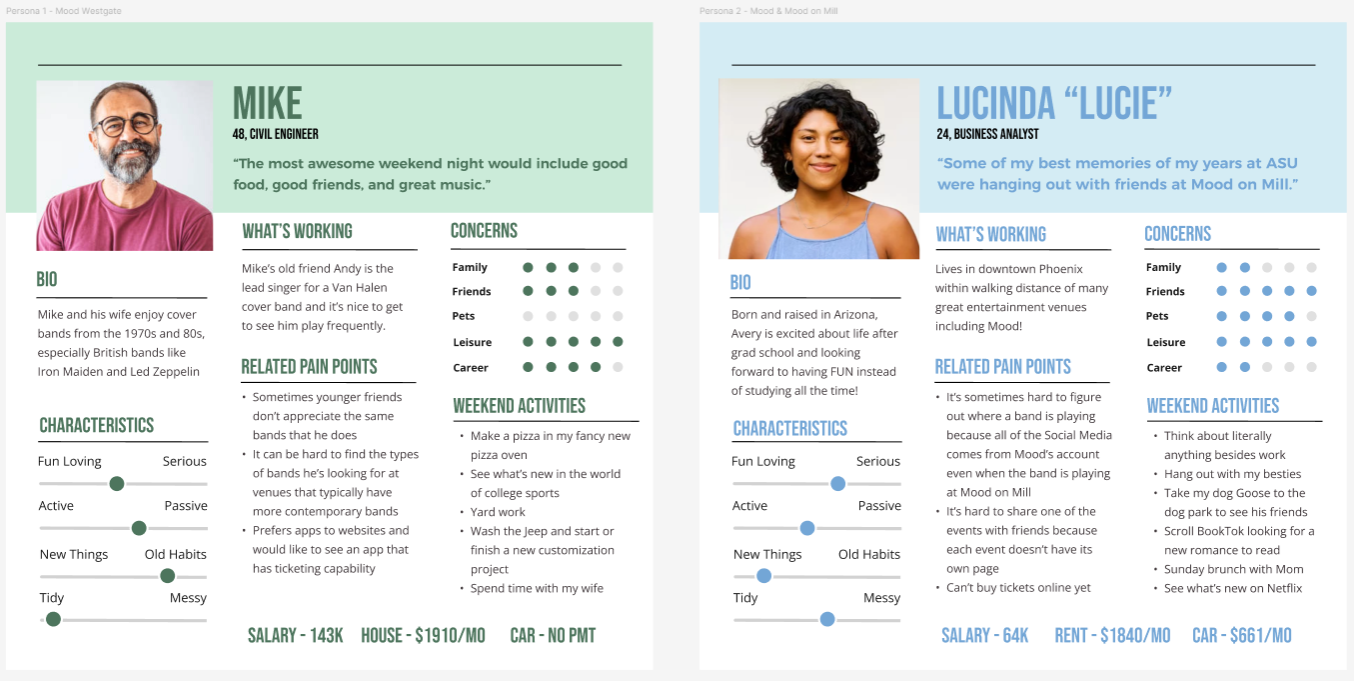
I began with competitive analysis of existing ticketing apps and developed user personas to understand our target audience's needs and pain points. From there, I moved into ideation and wireframing, conducting feedback sessions at the mid-fidelity stage to validate design directions before investing in high-fidelity work.

Key activities included:
Competitive analysis of major ticketing platforms
User persona analysis
Low to mid-fidelity wireframing with iterative feedback loops
High-fidelity prototype development
Process
Starting with the current user data to create a brand that makes sense.


Key insights that were directly inspired from Mike and Lucie:

Genre, date, and location filtering

Transparent pricing with
no hidden fees

Clear event details optimized for quick scanning
Using established ticketing apps like SeatGeek and Ticketmaster as references, I mapped three essential user flows: signing up or signing in, filtering events by genre and date, and completing a two-ticket purchase.
I delivered a clickable prototype demonstrating core user flows: account creation and sign-in, ticket purchasing, event browsing with filtering capabilities, and detailed event pages. The prototype successfully validated the design approach and provided Mood with a clear roadmap for development.

Mike and Lucie have similar needs in not wanting to spend all their time figuring out a new app. So through this project I found that using popular ticketing apps wasn't copying but creating an experience that is familiar and easy for Mike and Lucie.

Next steps: The current prototype focuses on key user journeys. A full production version would expand to include account management, order history, and venue-specific features based on user feedback.
Results and Lessons
This prototype was a learning experience in meeting user where they are at.